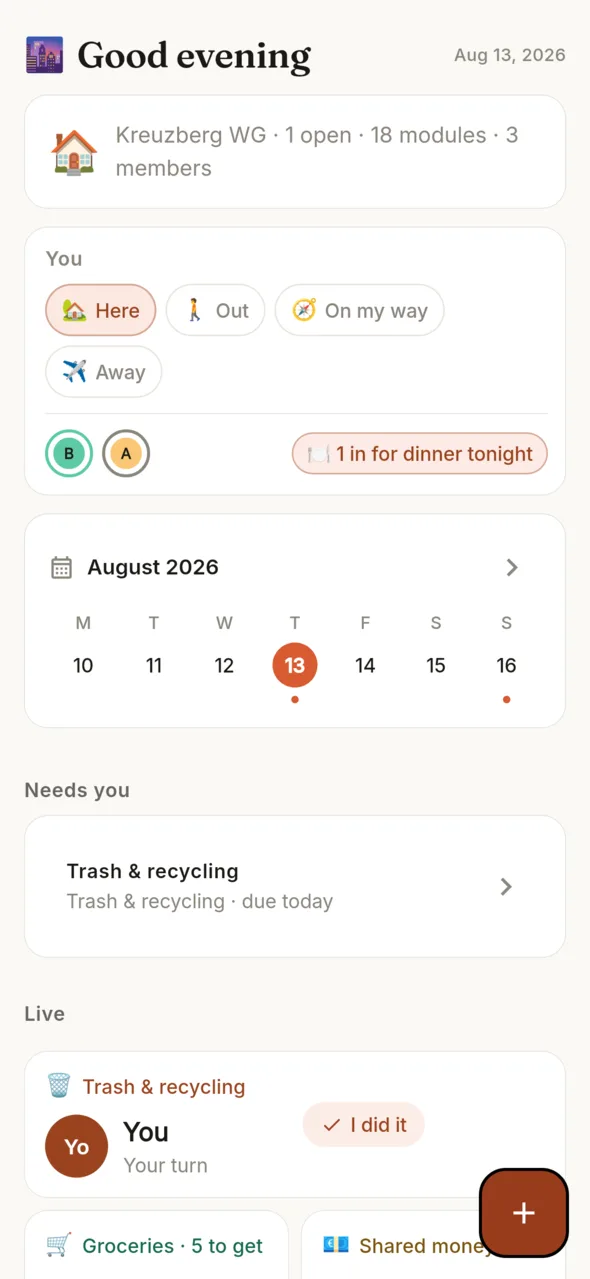
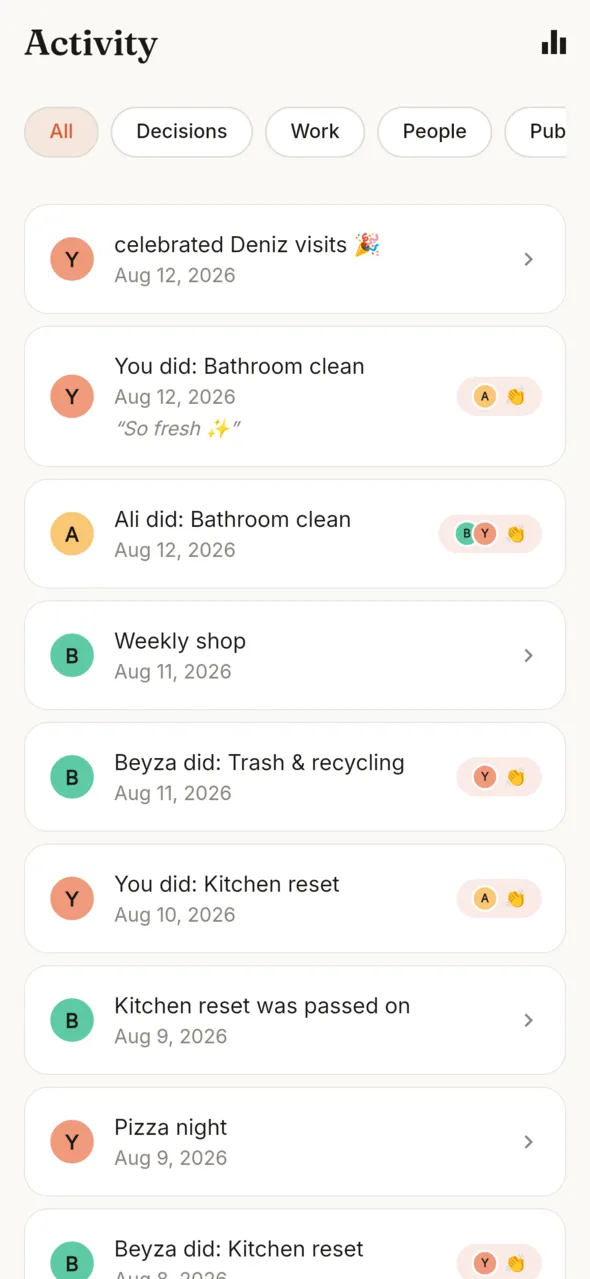
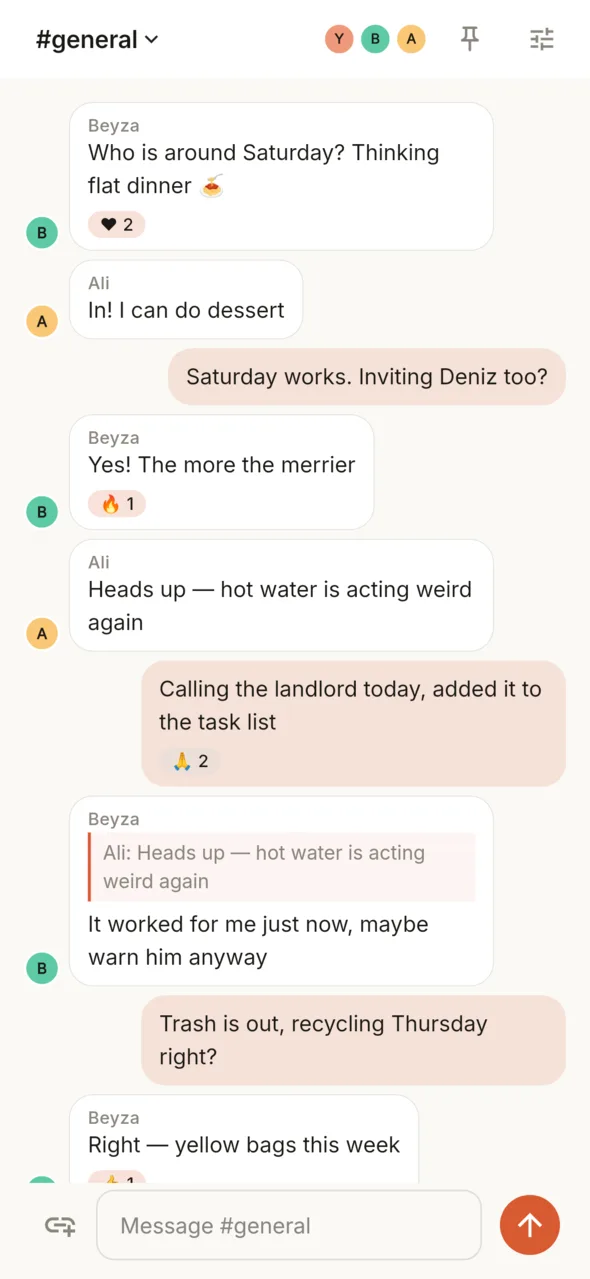
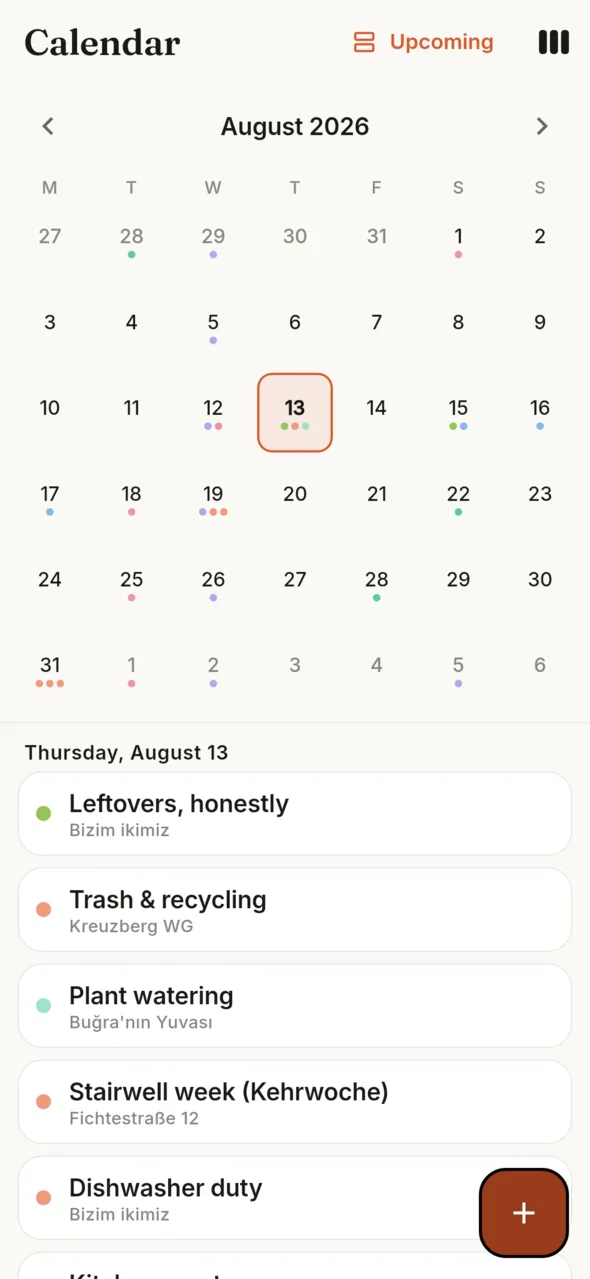
A Space is the thing you run — a home, a restaurant, an event, a crew. Claps gives the people inside it a private app, and everyone else a public Front Door that takes real bookings, orders and sign-ups.
Not mockups — the real screens over a real Space, drawn by the same code the app ships with.
Home is the boardWho's in, the week, and every module live.
Effort gets applauseWhat happened, and the hands behind every count.
The house group, at homeRooms, replies and reactions — where the chores live.
One calendar for all of itEvery Space's dates in one month.
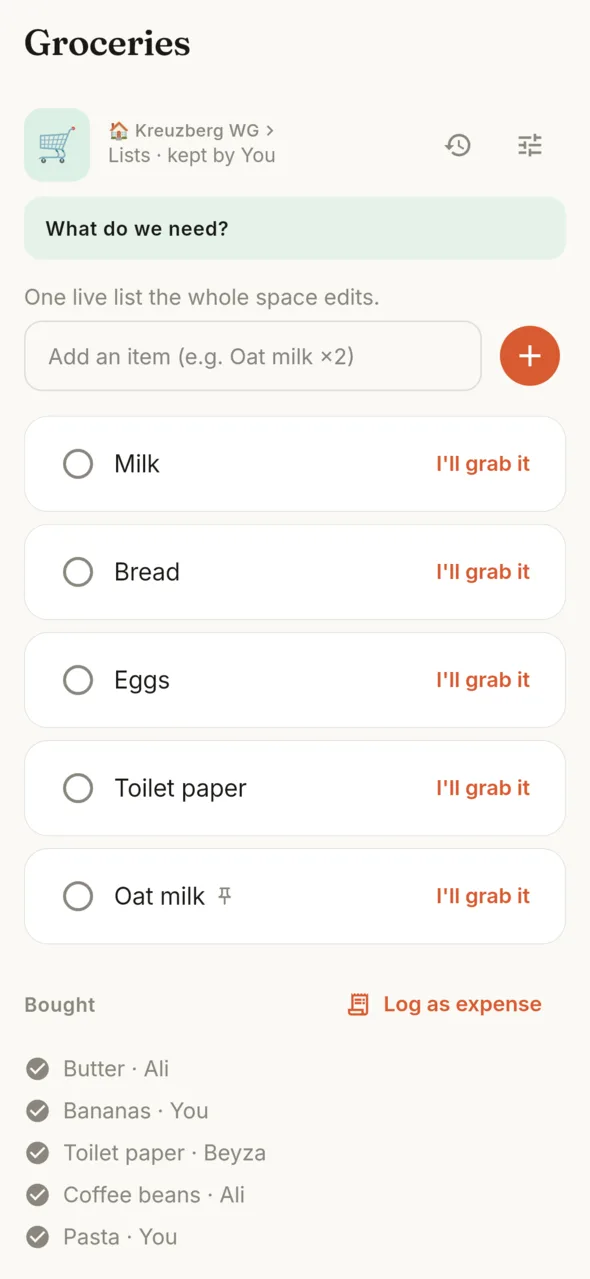
Out of toilet paper, onceOne live list the whole Space edits.
One Space, two doors
Every Space has an inside and an outside.
Both are the same Space — one is for its members, the other for the whole world. You decide what crosses.
The Front Door — its website
A public website that is also a mini-app: a hero, sections you arrange, and buttons that do things — book, order, register, send a form. It lives on your Space's own handle, shares as one link, and fits on a QR code.
The private app — its workspace
Members land on Home — a board of live widgets you arrange by hand, one per module, each showing what it knows right now. The dock keeps the same five doors in every Space: Home, Space (all its apps), Chat, Pulse — the Space's own feed of what happened — and your profile.
Space apps
The same platform, a different app every time.
Pick a Space type. The dock is the app its members get; beside it is the Front Door its public sees. Install as many modules as the work needs — the dock stays five doors wide, and you choose its two shortcuts.
🏠 Home — Kreuzberg WG
The private app
Kreuzberg WG
Today, at a glance
Tasks3
Calendar2
Rotas
Lists5
Expenses1
Home
Space
Chat
Pulse
Profile
The Front Door
🏠Kreuzberg WG
Four people, one kitchen, peace.
Send a form
Info cards
Albums
Enter Space
🍽️ Restaurant — Café Amara
The private app
Café Amara
Today, at a glance
Reservations12
Orders4
Catalog
Passes & access7
Records2
Home
Space
Chat
Pulse
Profile
The Front Door
🍽️Café Amara
Tables, takeaway and tonight's menu.
Request booking
Place order
Catalog
Events
Enter Space
🎫 Event — Lindenfest ’26
The private app
Lindenfest ’26
Today, at a glance
Program48
Attendees6
Passes & access
Forms3
Albums9
Home
Space
Chat
Pulse
Profile
The Front Door
🎫Lindenfest ’26
One weekend, three stages, everybody in.
Register
Claim pass
Events
Albums
Enter Space
🧘 Studio — Studio Nore
The private app
Studio Nore
Today, at a glance
Appointments5
Customers2
Catalog
Forms8
Time1
Home
Space
Chat
Pulse
Profile
The Front Door
🧘Studio Nore
Appointments that book themselves.
Request booking
Send a form
Catalog
Forms
Enter Space
🚀 Project — Atlas Launch
The private app
Atlas Launch
Today, at a glance
Board7
Files3
Tasks
Goals12
Library2
Home
Space
Chat
Pulse
Profile
The Front Door
🚀Atlas Launch
The build, in public.
Subscribe
Library
Albums
Enter Space
🤝 Community — Kiez Kollektiv
The private app
Kiez Kollektiv
Today, at a glance
Events24
Directory5
Campaigns
Forms2
Albums6
Home
Space
Chat
Pulse
Profile
The Front Door
🤝Kiez Kollektiv
What's on, and who's around.
Register
Subscribe
Events
Directory
Enter Space
🏢 Building — Lindenhof 12
The private app
Lindenhof 12
Today, at a glance
Requests4
Announcements9
Info cards
Polls2
Places3
Home
Space
Chat
Pulse
Profile
The Front Door
🏢Lindenhof 12
Twelve floors, one front door.
Send a form
Info cards
Announcements
Enter Space
🧳 Trip — Lisbon ’27
The private app
Lisbon ’27
Today, at a glance
Plan6
Expenses2
Places
Albums14
Countdowns4
Home
Space
Chat
Pulse
Profile
The Front Door
🧳Lisbon ’27
Five friends, one map.
Subscribe
Albums
Places
Enter Space
The dock is the same five doors in every Space — it never rearranges itself, and how often you tap something changes nothing. What differs is the board: you hold a widget, you move it, and it stays where you put it for everyone.
Under the hood
Thirty-six engines, wearing your names.
Every module is one of 36 engines — generic machinery your Space renames. A restaurant's Reservations and a studio's Appointments run the same engine; only the name and the settings differ. In your app, they are simply modules.
Run the work
Who does what, decided fairly — or claimed.
Rotas
Tasks
Project board
Sign-up sheets
Requests
Allocations
Time
Welcome the public
What the Front Door sells, books and signs up.
Events
Reservations
Catalog
Orders
Passes & access
Forms
Campaigns
Keep the record
Facts, things and history that outlive the group chat.
Inventory
Records
Tracker
Directory
Places
Library
Albums
Info cards
Money and things
Who paid, who saved, who borrowed the drill.
Expenses
Fund
Lending
Wishlist
Everyday together
The small machinery of living and deciding together.
Lists
Meals
Check-in
Countdowns
Schedule
Polls
Notice board
Goals
Habits
Talk it through
Every Space ships with Chat — channels, pins and mentions, inside the same walls.
Chat
Nothing fits? Compose your own module — name it, choose how it behaves, and it arrives alive, not empty.
Guests
People outside can act, not just look.
A guest books a table, orders, registers for the event, claims a pass or sends a form with a name and an email. No account, no install, no small print.
Request booking
Place order
Register
Claim pass
Send a form
Subscribe
Every action ends in a receipt, and updates go to the email the guest entered. Signing in stays optional — it makes returning easier, and it still doesn't make anyone a member.
The boundary
Public is not member.
Sharing the Front Door — the link, the handle, the QR code — invites nobody in. Membership moves only by private invitation, and a guest who signs in is still not quietly added to the private side.
Inside, every Space keeps its own walls: its people, modules and Chat never leak into another Space, and the private app is invisible from the web.
Changelog
What changed, and when.
We're building this in the open. Every build that goes up here gets written down.
0.19.2CurrentYour tap wins16 August 2026
Instant appearance. Dark, light and system mode repaint immediately while the profile saves in the background.
Instant presence. “Where are you?” choices appear on tap and reconcile with the live backend afterward.
0.19.1A clearer way in16 August 2026
Public identity opens. Existing Spaces are repaired and every new Space automatically receives its private Front Door draft.
One Space entrance. Front Door now leads the Space tab; the duplicate grid button beside notifications is gone.
Home answers in order. Today leads, Live follows, and large dashboards start compact with an explicit expansion.
0.19.0Built for the hundredth household16 August 2026
Ready to grow. Chat, turns, reactions, claps and notifications now use atomic server operations and indexed reads, so simultaneous taps do not overwrite one another.
Chat presence is real. Faces in Chat now show members who are actually online, through a private channel only Space members can enter.
Faster public pages. The Front Door is cached safely at Cloudflare's edge, while personal forms and receipts stay private.
0.18.0Home is the board28 July 2026
The widgets lead. The board used to sit eighth on Home, under a greeting, a summary, presence, the week and a list. It is the first thing now — which is the whole idea of a home screen.
Only real widgets. An engine with no card of its own no longer takes a tile. Sixteen of them showed a grey box with a count; a restaurant put its bookings, its menu and its orders on Home as three identical boxes. They live in the Space tab instead, one tap away.
Tonight. The first widget that belongs to no module: what the evening holds, gathered from every engine that has something dated — and only what the board cannot already say.
Gone: the pinned-shortcut row. It was the third way to reach a module from one screen.
0.17.0The Space gets a tab28 July 2026
A tab of its own. Every app in the Space now lives behind one dock tab, together with the Front Door. The calendar gave up its seat — it is one tap from Home, on the arrow beside the week.
A widget can leave. Hold a widget and take it off Home. The module stays installed and keeps everything in it; the Space tab is where it comes back from.
Faster where it was slowest. A message is on screen the moment you send it, and dragging a widget carries one tile instead of three live copies.
The Front Door shows what you sell. Priced items are on the page instead of behind a button, and opening hours are drawn for readers, not only for search engines.
0.16.0Widgets with something to show26 July 2026
Rings, trends and faces. The pot is a ring that fills as it fills. What you owe rolls over when it changes, with six weeks of balance behind it. A rota shows who is up and whose turn comes after. A sign-up sheet shows the faces that claimed it.
Sizes that suit. A vote or a conversation takes the whole row; whose-turn and the shopping list stand tall beside a stack of small ones; a countdown is just its number.
It keeps time. Leave Home open and the countdown counts down, and after midnight “today” means today.
Fixed: long buttons could run off the edge of a narrow tile — in every language, at every text size.
0.15.2Readable, and nothing hidden26 July 2026
The tiles read again. The coloured background was fighting the text on it; widgets are back on paper, with the colour on the name, the numbers and the meters where it belongs.
Every module is on Home. The board used to stop at four with a “show more” under it — so a module you added could be nowhere in sight. They are all there now.
0.15.1Widgets that look like what they are25 July 2026
Each module now has its own widget. A countdown is the number getting smaller. A rota is the face whose turn it is. The shopping list is three things you can tick from Home. A poll is bars you tap to vote. The pot is a bar filling up. Dinner is the dish, big.
They were all the same shape before — a line of text and a button, in different colours.
0.15.0Your Space, as a home screen25 July 2026
Home is a board of widgets. Every module is its own tile in its own colour — tonight's dinner, whose turn, the pot, the countdown, the open vote. Hold one to pick it up and drop it where you want it; hold it still and it offers its settings. Tap it and you are in the module.
Five tabs that stay put. Home, Calendar, Chat, Pulse, Profile — the same five in every Space, instead of two of them changing into whichever modules happened to be installed. The calendar has a permanent seat.
Hand a task to someone. A task could be given a deadline but never an owner; now the household's faces sit next to the date, and the person you pick is told.
Fixed: the download that started and never finished · the + whose options were dead until you typed, and never said what a tap would do · switches you could not tell were on · Android's navigation bar sitting on top of a sheet's buttons.
0.14.1Faster, and it remembers you24 July 2026
Instant tabs. Every tap used to rebuild the whole screen from scratch — a cold reload, every time. Tabs stay warm now, so moving around the app is immediate.
Sign in and you're home. Coming back no longer drops you on "create a Space" — you land in the Space you already have.
0.14.0Home comes alive — every module, a living widget24 July 2026
Home is your Space, living. Every module now puts an interactive card on Home — who's home, tonight's dinner, whose turn, the open poll, the shopping list, the countdown — each one tap from its real action. Add a module and its card appears at once.
Your data is yours. You → Account: export everything you've added as a file, or delete your account for good (shared Spaces stay for the others).
Links open the app, settings found their homes. A getclaps.app link lands in Claps; your profile sits top-right, a Space's own settings in its switcher.
Steadier underneath. Completing a chore is atomic (no doubles), invites are unguessable, and the app now reports its own crashes.
0.13.3The door to the Space's room24 July 2026
Space settings are reachable again. The launcher (grid icon) gained a Space settings button — the room holding the public designer, Share/QR and the Front Door had been left without a door by the shell rewrite.
0.13.2The app that explains itself24 July 2026
Pulse works. The two-release 'try again' had one line left: the server's reply arriving as an untyped list. Typed at the door, pinned by a test.
Your first time is guided. The first visit to each surface spotlights its controls — tap the real button to advance, say 'don't show again' and it never speaks again.
The calendar opens whole. Month grid by default, swipe to page, and what you add appears the moment you add it — the first day of a period is no longer silently empty.
Links open the app. A getclaps.app link tapped in a chat or browser lands in the app, verified by Android App Links.
A booking rings the owner. Reservations, orders, registrations and form submissions now reach the pocket, not just the bell.
The public face is manageable again — Space settings gained 'Design public experience' and 'Share Space', and the guest page's member door became a quiet footnote.
0.13.1The tabs breathe, Pulse speaks, the doors open24 July 2026
The dead space above every tab is gone. Home, Chat and Pulse now start right under the Space header.
The Front Doors are on the internet. Every published Space answers at its own address — like test-lale-table.getclaps.app — and buttons say what they do.
When Pulse cannot load, it now says why — a small diagnostic line under the retry button, so a field report names the cause.
0.13.0Effort counts, and the screen never goes blank24 July 2026
Your week is back on Home. A compact week strip sits right under the Space's status — the Space's own week start, a dot on days that still hold something open, today ringed, one tap into the full calendar.
A dropped connection no longer empties the screen. Every live view now keeps what it already loaded and reconnects quietly in the background. "Try again" only appears when there was truly nothing to show.
Work has a weight now. Every module carries an agreed effort size — S, M or L — and completions inherit it, so the Balance view can tell taking out the bins apart from deep-cleaning the kitchen.
Replies reach the person who asked. Answer someone in a thread and they hear about it — respecting their notification dials and quiet hours, and never doubling up with chat or DM alerts.
Tap a clap to see the hands. Every clap count opens the faces behind it — who clapped, and when.
Fit and finish in four languages. Dock labels stay on one line on narrow phones, German buttons fit, and the builder now opens a gallery of all 36 engine kinds.
0.12.0Every Space becomes an app21 July 2026
Claps grew from 17 modules into 36 generic engines. Events, requests, reservations, inventory, records, forms, directory, time, albums, places, goals, tracker, allocations, library, catalogue, orders, passes, campaigns and Chat now sit beside the original shared-work tools.
Every Space can have its own modular website and mini app. Claim a unique handle, arrange public sections, and share the whole Space or one action with its own link and QR code.
Public does not mean member. A guest can book, order or register with a name and email without opening an account. Signing in is optional and never silently adds a customer to the private Space.
The private side now feels like an operating workspace. Home shows a cross-Space pulse; each Space has Overview, Apps and People, plus searchable launchers, pinned outcomes, notification controls and typed connections between engines.
Four new starting points show the wider platform. Restaurant or café, public event, service studio and community hub bring the total to 21 Space templates and use the same generic engines in very different combinations.
The released app no longer contains a demo runtime or anonymous private workspace fallback. Private Spaces use real email or Google sign-in; public pages remain open, and the new test world is isolated from production behaviour.
0.11.0You can ask, and it speaks your language20 July 2026
Claps had no way to give a task to anybody. Every list only ever wrote your own name. You can ask someone now, and their name lands immediately — an ask nobody has answered leaves a chore less owned than it was, while both people believe the other has it. What protects the person asked is the exit, not a veto beforehand: Hand back is one tap on the row, no confirmation, no undo. It tells exactly one person, whoever asked, and nothing about asking or handing back ever reaches the feed.
The app only really spoke English. 17 space templates and 171 module templates were hardcoded English with no translation key anywhere — so the second screen a new German, Turkish or Dutch user ever saw, and the whole module picker, were in a language they had not chosen. 376 names and pitches are translated now, and there is a language picker: English, Türkçe, Deutsch, Nederlands, or follow the phone. Until now the app followed the handset and nothing else — and a French phone got German, because the fallback picked the alphabetically first file.
Notifications only ever rang a phone that was already awake. Push reaches a closed phone now — and because it is composed on the server, quiet hours, digest mode and muted modules are enforced there too. Otherwise a clap that had politely waited out the night on the phone would have arrived from the server at 3am. It is also written in the recipient's language, not the sender's.
The month view was hiding a week. The grid always built six rows of days and the screen only ever had room for five, so seven days sat below a fold with nothing to say they were there. Six fixed rows now, sized to the room they have. And the week start a space chose is finally honoured in the month grid, which had been anchoring its first column on the wrong day and drawing that day with no events on it.
Every expense was everyone's. The ledger divided each one equally across the whole space, and editing one re-split it — so fixing a typo in a title destroyed the split. You choose who's in now: everyone starts ticked, untick the housemate who was away or the one who doesn't eat meat, and it divides across whoever is left. Exact amounts are a step deeper, with a running remainder and a save that refuses until the shares add up.
Fixed: on the live backend, ticking a board card off the Today agenda marked it finished while the board went on showing it in Doing, permanently · being let into a space was reachable from nowhere once you had a space of your own · push tokens were registered in the phone's language rather than the one you picked, so screen and notification could disagree · and 323 characters in one source file, mangled by an earlier session writing UTF-8 through PowerShell, have been repaired.
0.10.0The app gets a clock19 July 2026
The app had no clock. A rota only moved when somebody touched it — so if the flat stopped opening Claps, the bins turn sat on one person, overdue, forever, and nobody else's turn ever arrived. The household that stops cooperating is exactly the one this app is for. A turn that goes a full cycle past due is now marked missed and the queue walks on by itself. A missed turn is not a skipped one: nobody chose it, so it earns no clap and its line in the feed carries no name.
An overdue turn belongs to the space. Anyone can pass it on. One person going quiet used to lock the whole flat.
Things are allowed to be over. We sell trips, parties, moves and one-day events, and the app could only model things that go on forever. Spaces and modules can be put away now — an archived space leaves Home and your notifications, stays fully readable, and opening it gives you the Sunday page widened to its whole life: what your crew did, who did it, the claps.
Most of the app couldn't earn a clap. Only three things counted as somebody doing something. Buying the week's shopping, cooking the meal that was planned, filling the last slot on a sheet — none of them existed. All seventeen module kinds have been gone through.
Keeping things running is visible now. A module has a keeper — handed over, never assigned. The app used to clap for taking the bins out and have no idea who fixed the rota after a housemate moved out.
Fixed: the Essentials and Quiet notification settings were deleting every clap · a daily or weekly digest turned all notifications off and never sent a digest · a member had no way to leave a space · half the templates dropped a new user on "Today is clear. Enjoy the quiet" · the app said "press Add" and the button said "Install module" · a rota's day and running order could only be set in the beta builder · the module builder threw twelve sections of your work away on a stray swipe · and on the live backend a space's modules came back in a random order.
0.9.0You can see what a module is19 July 2026
Every module shows what it becomes. 183 templates carried their own starter content all along and nothing ever drew it. Now each one renders a real miniature — a rota showing three turns handing off, a board with cards already in its columns.
The picker stopped being a wall. Search that handles Turkish and German properly, a shortlist of what your space is missing, and looking at a paid module no longer costs you a purchase screen.
Build-your-own builds something. A module you composed used to arrive empty, and a project board you built had no columns and no way to add one.
The Sunday page. Five cards, once a week, opening on whoever went unthanked.
Ticking something off is something you watch happen. The row used to be replaced mid-frame by the gap under it closing, with the clap burst playing over the jump-cut. It now strikes through where it stands and leaves after.
The keyboard stopped covering the field. Three edit sheets read the keyboard's height from the screen underneath them — measured while the keyboard was still shut.
It stopped looking generic. The theme defined 8 of ~45 colour roles and Flutter picked the rest — black dividers, a solid orange pill on every screen. Fonts ship with the app now instead of downloading on first launch.
Fixed: cold start could drop you back on the sign-up screen · a new space was empty on day one · DMs and @-mentions produced no notification at all · switching spaces cancelled the other space's reminders · the badge stayed lit after you'd done the thing · a flatshare shipped two money ledgers, so one person could be told to pay and be owed the same €40.
0.8.0The loop runs in production19 July 2026
Worth a clap — one card on Home: one person, one thing they did, one button. Never a list.
Second claps, and the long-press that adds a note, reached nobody on the live backend. They do now.
One + everywhere that knows all 17 module kinds — type first, choose where it lands second.
Undo instead of "are you sure?", and writes stopped failing silently.
0.7.0Real accounts18 July 2026
Passwordless email sign-in and Google, with sign-in emails in all four languages.
Owner powers: hand over, leave, delete.
A proper week/month calendar across every space.
0.6.0Boards and habits17 July 2026
Project boards, habits with a partner, structured info cards, sign-up sheets, and a cross-space Upcoming view.
Get Claps
Open your Space.
Install the APK and sign in with your email — no password. Start from one of 21 templates or a blank Space, and publish its Front Door when it's ready; until then, it's yours alone. The app reads in English, Türkçe, Deutsch or Nederlands. iOS is next.